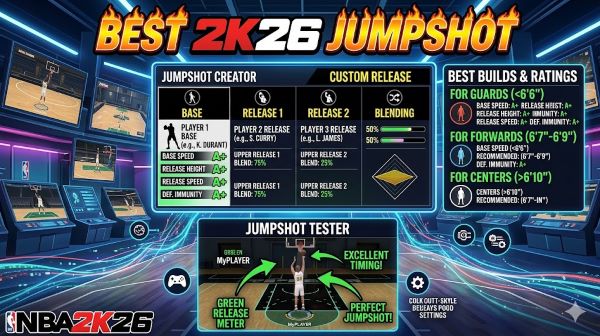
Your jumpshot makes or breaks your game in NBA 2K26. You can have all the right badges and stats, but if your shot animation is wrong, you’ll miss wide-open threes. Conversely, find the right shot and suddenly everything clicks. You start hitting shots that shouldn’t go in. Your teammates trust your shot. Your opponent respects your range.
The problem is that best 2K26 jumpshot isn’t a simple answer. What works perfectly for one player feels terrible for another. Your height, position, playstyle, and even personal preference all matter. That’s why understanding how to evaluate jumpshots and knowing which resources help you find the best one matters so much.
Let’s talk about how to find the right shot for your build and why it makes such a difference.
Understanding Jumpshot Mechanics in 2K26
Before talking about specific jumpshots, understanding how they work helps you evaluate them properly. Every jumpshot animation has distinct characteristics that affect your performance.
Release point is where the shot actually counts as released. Some animations have high release points, others low. Early shots are harder to green but have faster release. Late shots are easier to green but leave you vulnerable to contests.
Shot speed is how fast the animation plays. Quick shots are hard to contest but harder to time. Slow shots are easy to time but easier to contest. Finding the right balance matters.
Shooting motion determines how the shot feels and looks. Some players prefer side-step jumpers. Others want base jumpers. Some love step-back animations. The motion you feel confident with helps you perform better.
Shot meter responsiveness affects how sensitive the timing window is. Some animations have forgiving meters where you make shots even if you’re off slightly. Others require precise timing. Knowing what you’re using helps you adjust expectations.
Shot percentages vary based on animation. Some animations have higher green percentages at your attributes. Others have lower green percentages. The 2K community tests these extensively to identify which animations perform best.
Finding the Best 2K26 Jumpshot
Best jumpshot 2K26 requires research and testing. You can’t just pick something random and hope it works.
Visit NBA 2K Labs resources. The 2K community maintains detailed testing data about jumpshots. They test animations at different attributes and record green percentages. This data shows which animations perform best under various conditions.
2KLabs and similar resources provide:
- Green percentages for animations at different three-point ratings
- Release point information
- Shot speed comparisons
- Side-by-side animation comparisons
- Video demonstrations of animations
- Community feedback on which shots feel best
Check multiple sources. Different testers sometimes reach different conclusions. More data points help you make better decisions.
Consider your attributes. A shot that greens at 99 three-point rating might not perform as well at 85 rating. Your real attributes matter more than theoretical best shots.
Test before committing. Once you have candidates, test them in real games or practices. How a shot feels matters as much as how it performs statistically. A shot you’re comfortable with beats a shot that’s theoretically better but feels wrong.
Jumpshot Animations That Excel in 2K26
Several animations consistently perform well. Understanding which ones and why helps you narrow your choices.
Base animations from NBA players often perform well because they’re tested and refined. Jumpshots based on real NBA players have natural feel that helps with timing.
Custom animations built specifically for 2K26 sometimes outperform real player animations. Game designers tune these for optimal performance in the game.
Mid-range jumpers work well if you’re a shoot-first player. They have good balance between ease of timing and green percentages.
Three-point jumpers obviously work best for three-point shooting. Some are designed to be easy to green. Others prioritize shot speed.
Stepback animations add versatility. They let you create space against tight defense. Some shots include stepback variants.
The “green jumper” designation means an animation that’s consistently easy to green. These animations have forgiving timing windows. Players who struggle with shot timing benefit from green jumpers.
Using 2K Labs Data to Make Decisions
2KLab and NBA 2KLabs resources provide data that seems overwhelming at first. Breaking it down helps.
Green percentages show how often you make shots when you green the meter. Higher is better, obviously. An animation that greens 90 percent of the time is better than one that greens 60 percent.
Consistency metrics show how much variation exists across different attempts. Some animations are consistent. Others vary significantly based on position, defensive pressure, and other factors.
Range shows how far the animation shoots from. Some animations have longer range, meaning you can green threes from further back. Others have shorter range, affecting how far you can be from the basket and still make it.
Comparison videos let you see animations side by side. Watching how they feel and look helps you understand if they’re right for your playstyle.
Community ratings show what players think. If thousands of players use an animation and rate it highly, that’s valuable information. If an animation has low ratings despite good stats, there might be a reason.
The Green Meter in 2K26
The green meter 2K system is how you actually make shots. Understanding it helps you choose appropriate jumpshots.
The green window is the timing window where the meter is green. Hit a shot while the meter is green, and you get the best result. The wider the green window, the easier the shot to green.
Different animations have different green window sizes. Some animations have huge green windows. Others have tight windows requiring precision.
Your shooting badges affect the green window. Gold and Hall of Fame shooting badges expand the window. Catch-and-shoot, range extender, and other shooting badges matter.
Shot release timing is what you control. You need to release the button when the meter is green. The animation speed determines how fast the meter moves, which affects how hard the timing is.
Contested shots affect the green meter. Being defended tightens the green window. Being wide open makes the window larger. Understanding that defensive pressure affects your shot timing helps you evaluate animations in realistic conditions.
Jumpshots for Different Playstyles
The best shot for a three-point sharpshooter differs from the best shot for a two-way forward. Your playstyle determines which animations work best.
Three-point specialists benefit from animations with large green windows and long range. Animations that are easy to green help rack up points from distance.
Mid-range shooters want animations with good mid-range performance. Three-point range matters less. Balance between ease of timing and shot speed matters more.
Catch-and-shoot players benefit from animations with quick releases. The faster the shot, the less time defenders have to contest.
Create-your-own-shot players want versatile animations that feel natural for stepbacks and movement shots.
Slasher types want shots that don’t require extreme range or speed since they’re not primary scorers. A reliable mid-range option works better than chasing three-point shooting.
2K26 Specific Improvements
2K26 made changes to how jumpshots work compared to previous years. Understanding what changed helps you adapt.
The green meter tuning is different. Some animations that were easy to green in 2K25 are harder in 2K26. Others improved. Testing in 2K26 specifically matters because data from previous years might not transfer.
Shot speed was adjusted for balance. Some animations are faster or slower than in previous versions.
Badges were rebalanced. Some shooting badges have different effects. Your badge setup affects which animations perform best.
Defensive mechanics changed. Contests affect green windows differently. Understanding the new contest system helps you evaluate animations.
The general philosophy in 2K26 seems to be balance. Extremely easy shots were toned down. Harder shots became more viable. The goal is variety in competitive play.
NBA2KLabs Resources and Community
NBA2KLabs is a primary resource for 2K information. The site maintains updated data on jumpshots, badges, builds, and more.
The community testing is extensive. Players test hundreds of animations at different attribute levels. They record results and publish data. This volunteer work helps the entire community.
Video content shows how animations actually look and feel. Watching videos helps you understand if a shot is right for you better than reading statistics.
Community feedback provides real-world experience. If players are having success with an animation, you hear about it. If an animation is overrated, you hear about that too.
The data gets updated regularly. As patches change things, the community retests and updates their findings. Using current data matters more than old data.
Can You Play 2K24 Next Gen on Xbox One?
This question sometimes comes up alongside 2K26 discussion. Can you play 2K24 next gen on Xbox One is the answer many players want to know.
The short answer is no. Next Gen versions are exclusive to PlayStation 5, Xbox Series X, and Xbox Series S. Xbox One can only play the current-gen version of 2K24.
Current-gen and next-gen have significant differences. Next-gen has better graphics and some gameplay differences. If you want next-gen specifically, you need the appropriate hardware.
For 2K26, the same applies. Next-gen exclusive features aren’t available on Xbox One. You get a full game, but not the next-gen experience.
The jumpshot information does transfer between versions though. Jumpshots that work well on next-gen generally work well on current-gen. The animations are the same even if the graphics are different.
Jumpshot Selection Process
Here’s how to systematically find the best jumpshot for you.
Step 1: Identify your playstyle. Are you primarily a catch-and-shoot player, a creator, or a mid-range specialist? Your playstyle narrows which animations make sense.
Step 2: Check 2K Labs data. Look at which animations have the highest green percentages for your three-point rating and badge setup.
Step 3: Watch videos. See how the top animations actually look. Identify which ones appeal to you visually.
Step 4: Test in practice. Create a player with your attributes and test the top three animations. Shoot ten threes with each and see how many you green.
Step 5: Play real games. The ultimate test is real game performance. Play games with your preferred animation and track your three-point percentage.
Step 6: Adjust if needed. If you’re not hitting, try another animation. Sometimes a shot that looks good statistically just doesn’t feel right to you personally.
Common Jumpshot Mistakes
Players often make mistakes when choosing jumpshots.
Chasing meta. Just because an animation is popular doesn’t mean it’s right for you. Popular shots often have hype that doesn’t match reality. Choose based on what works for you.
Ignoring personal preference. A shot you hate using will hurt your game regardless of stats. Choose a shot you’re comfortable with.
Not testing. Theory and practice differ. Test before committing. A shot that looks perfect on paper might feel terrible when you use it.
Changing too often. You improve with familiarity. Using a shot for a few games then switching to another prevents you from learning it properly. Stick with a shot long enough to adapt.
Forgetting about contested shots. Green percentages matter, but defense exists. Choose a shot that performs well even when contested, not just when you’re open.
Ignoring your attributes. A shot that requires 99 three-point rating might not work well at 85. Consider your actual attributes.
Green Meter Tips and Tricks
Mastering the green meter improves your shot consistency.
Know your animation speed. Fast animations have quick meter movement. Slow animations give you more time to react. Understanding your animation’s speed helps with timing.
Practice the timing. The green window is consistent. Practice shooting in practice mode until the timing is muscle memory.
Focus on release. Actually releasing the button at the right moment matters more than when you press it. Mental timing of release beats button mashing.
Watch the meter. Don’t look at the player. Watch the meter. Your eyes should track the green window, not the animation.
Account for latency. Online games have network lag. Your release might land differently online than offline. Adjust your timing expectations.
Use open shots to learn. Practice timing on wide-open shots first. Once you’re consistent, move to contested situations.
Key Takeaways
- Best 2K26 jumpshot depends on your playstyle, attributes, and personal preference. What works for one player might not work for another.
- NBA 2K Labs and 2KLabs resources provide community-tested data on jumpshot performance, green percentages, and comparisons.
- 2K labs 2K26 data gets updated as patches change the game. Using current data matters more than old data from previous seasons.
- Green meter 2K mechanics determine how easily you green shots. Animations with larger green windows are easier to time but might sacrifice other benefits.
- Green jumper animations are specifically designed to be easy to green. They’re valuable if shot timing is your weakness.
- Best jumpshot 2K26 requires testing. Statistically optimal animations might not feel right to you personally.
- NBA 2KLabs community testing shows which animations perform best at different attribute levels. Use this data to narrow your choices.
- 2KLab video content helps you understand how animations look and feel beyond just statistics.
- Can you play 2K24 next gen on Xbox One is no, but the jumpshot information transfers between current-gen and next-gen.
- Your attributes directly affect which animations perform well. A shot optimal at 99 three-point rating might perform differently at 85.
- Shooting badges significantly affect your performance. Gold and Hall of Fame shooting badges expand your green window and increase percentages.
- Personal preference matters as much as statistics. Choose a shot you’re comfortable with and confident in.
- Practice with your chosen shot in practice mode before using it in competitive games. Timing should become muscle memory.
- Avoid constantly switching shots. Stick with one long enough to learn it properly.
- The meta changes with patches and updates. What was best last month might not be best now. Check current data before making changes.
- If you’re struggling with your shot in 2K26, visit 2K Labs resources, test your top candidates in practice, and find what works for you.