Wondering how often should I upgrade my GPU as a jogameplayer? This guide covers the real upgrade cycle, what GPU generations actually deliver, and how to know when your current card has genuinely run out of road.
GPU upgrade anxiety is real. A new card drops, the benchmark videos flood your feed, and suddenly the card you bought two years ago feels ancient. But if you step back from the hype cycle, the question of how often should I upgrade my GPU as a jogameplayer has a more measured answer than the hardware community often suggests. The honest answer is: less often than GPU manufacturers would prefer, and more often than people who never upgrade would admit. This guide breaks down the real upgrade cycle, what actually signals that your GPU needs replacing, and how to think through the decision without spending money you do not need to spend.
The Short Answer: Every 3 to 4 Years for Most Gamers
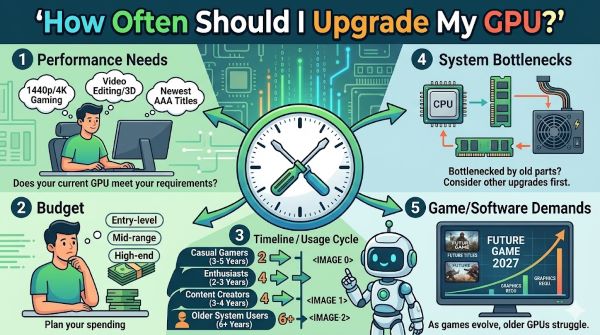
If you want a number to anchor to, 3 to 4 years is the GPU upgrade cycle that makes sense for most jogameplayers. Here is why that range holds up across most situations:
GPU performance generational leaps have slowed compared to the rapid jumps of the early 2010s. A high-end card from 4 years ago still runs most modern games at solid frame rates at 1080p or 1440p with some settings adjustments. A mid-range card from 4 years ago starts to struggle at the settings and resolutions it handled comfortably at launch.
The 3 to 4 year window also aligns with how game engines advance. Major graphical jumps in games tend to happen on console generation transitions, and the current console generation (PS5 and Xbox Series X) launched in late 2020. PC games are now fully built around that hardware baseline, which means GPU demands on PC are climbing to match.
That said, the 3 to 4 year cycle is a starting point, not a rule. Your actual upgrade timing depends on several variables.
What Your Target Resolution and Frame Rate Actually Determine
The most important factor in GPU longevity is the resolution and frame rate you play at. These two numbers define how hard your GPU works, and they set the ceiling for how long a given card stays relevant.
1080p gaming: GPUs last longer here. A mid-range card from 3 to 5 years ago still handles 1080p at high settings in most games. If you are happy at 1080p and 60fps, your upgrade cycle can stretch to 5 or even 6 years with a strong card. If you want 1080p at 144fps or higher in demanding titles, you will feel the pressure sooner.
1440p gaming: This is the sweet spot that most PC gamers are moving toward, and it is where mid-range cards start to show their age fastest. A card that launched as a 1440p card 3 years ago may now struggle to maintain 60fps at high settings in the most demanding titles. At 1440p with a 144Hz or 165Hz monitor, 3 years is a reasonable upgrade window.
4K gaming: 4K gaming at high settings and 60fps or above is demanding enough that even current-generation high-end cards work hard. If you play at 4K, you are likely already buying high-end cards, and those can stretch to 4 years if you are willing to adjust settings. For 4K at 120fps or higher, the current generation of cards may not fully satisfy you regardless of your current card’s age.
The Real Signals That Your GPU Needs Replacing
Rather than following a fixed schedule, watch for these concrete signs that your current card has run out of road.
Frame rate drops below your acceptable floor in games you care about This is the clearest signal. If you are consistently dropping below 60fps in the games you play most, and you have already optimized your settings, your GPU is the bottleneck. Note that a single game performing badly is not always a GPU problem: some games are poorly optimized. A pattern across multiple titles is the signal.
Your GPU drops below minimum VRAM requirements for new games VRAM requirements for new PC games have climbed significantly. Many games released in 2024 and 2025 list 8GB VRAM as the minimum for even medium settings, with 12GB or 16GB recommended for high settings and 4K. Cards with 6GB or 8GB VRAM that were comfortable two or three years ago are starting to hit these limits. If you are regularly seeing VRAM warnings in games or stuttering that is specifically tied to texture loading, VRAM ceiling is your problem and a new GPU solves it.
The game you want to play requires DirectX 12 Ultimate or Mesh Shaders features your card does not support Hardware-level feature support is a hard wall. If a game requires a feature your GPU’s architecture does not support, no driver update fixes it. DirectX 12 Ultimate (which includes ray tracing tier 1.1, mesh shaders, and variable rate shading) requires NVIDIA RTX 20-series or AMD RX 6000-series or newer. Older cards are locked out of these features regardless of their raw performance.
Driver support for your card has ended GPU manufacturers eventually stop releasing driver updates for older cards. NVIDIA and AMD typically support cards for 5 to 7 years after launch, but once support ends, new games optimized for current-driver features may run worse on unsupported cards. Check the support page for your specific GPU to see if it is still in active driver support.
Your card runs hot enough to throttle under load Thermal throttling is when a GPU reduces its clock speed to prevent overheating, causing in-game frame rate drops under load. This can happen to newer cards with inadequate cooling, but it also happens to older cards whose thermal paste has degraded or whose fans are failing. Before attributing throttling to age-related obsolescence, clean the card’s heatsink and consider repasting. If the card still throttles after maintenance, it may be reaching the end of its reliable service life.
How GPU Generations Actually Stack Up
Understanding what a single generation upgrade buys you helps calibrate whether upgrading makes sense at your current point in the cycle.
As a general reference across the last several years:
- Skipping one generation typically yields 20 to 35 percent performance improvement in the same price tier
- Skipping two generations typically yields 40 to 60 percent improvement
- Skipping three or more generations at the same tier can double or more the performance
This is why the advice to skip at least one generation before upgrading appears consistently in gaming communities. A one-generation hop in the same price bracket often does not justify the cost. A two-generation or three-generation hop delivers meaningful, noticeable gains across all the games you play.
For a jogameplayer running an NVIDIA RTX 3070 from 2020, for example, upgrading to an RTX 4070 in 2023 would have offered a moderate improvement at significant cost. Waiting for the RTX 5070 in 2025 delivers a larger performance jump for potentially the same or lower price than the 4070 launched at.
When to Upgrade Sooner Than 3 Years
Some situations justify a shorter upgrade cycle.
Your monitor resolution or refresh rate outpaced your GPU If you upgraded your monitor from 1080p to 1440p, or from 60Hz to 144Hz or 165Hz, your GPU now has more work to do than it was bought to handle. Matching your GPU to your display is reasonable even if the card is only 2 years old.
You moved to VR gaming VR requires significantly more GPU power than flat-screen gaming at equivalent visual quality. A card that is comfortable for 1440p flat gaming may struggle with VR at acceptable quality and comfort frame rates. If you added a VR headset, reassess your GPU independently of its age.
A specific GPU generation has a feature you genuinely need AI-based upscaling (NVIDIA DLSS, AMD FSR, Intel XeSS) has become a real gameplay feature rather than a marketing checkbox. If you are on an older card that lacks hardware-accelerated DLSS or does not support FSR 4, you are missing frame rate headroom that modern games build around. This is not always reason enough to upgrade immediately, but it is a legitimate consideration.
Your current card developed a hardware fault A failing GPU is a simple case. Replace it. The question becomes whether to buy used in the same generation to maintain budget, or to use the forced upgrade as an opportunity to jump to current generation hardware.
When to Hold Off Longer Than 4 Years
Upgrading is not always the right move. These situations justify waiting.
You play older games or indie titles If your library consists mostly of games released 5 or more years ago, or indie games with modest GPU requirements, an old card may serve you fine indefinitely. The GPU upgrade cycle is driven by the demands of new AAA titles. If you are not chasing those, the pressure to upgrade drops significantly.
The current GPU generation is mid-cycle GPU generations typically run 18 to 24 months before the next generation launches. If you are looking at upgrading 12 months into a generation, you will get better value per dollar waiting for the next generation, which brings either better performance at the same price or the same performance at a lower price. Monitor GPU roadmap coverage from reliable tech publications before committing.
GPU prices are elevated beyond their launch MSRP The 2021 to 2022 GPU shortage demonstrated how far prices can inflate above manufacturer suggested retail price. If current GPUs are selling for significantly above MSRP due to supply constraints or cryptocurrency mining demand, waiting for market normalization is financially rational.
You can adjust settings to extend your card’s relevance Before upgrading, audit your in-game settings. Dropping from Ultra to High in most games costs minimal visual quality but can recover 20 to 30 percent frame rate. Enabling AI upscaling (DLSS or FSR) in supported games can effectively extend a GPU’s useful life by 12 to 18 months. These adjustments are free. A new GPU is not.
The Used GPU Option
For jogameplayers on a tighter budget, the used GPU market deserves attention. A card that is one or two generations old at half its original retail price often delivers better value than a new current-generation budget card.
What to check before buying used:
- Mining history: Cards used for cryptocurrency mining run under sustained high loads, which stresses the GPU and VRAM. Ask sellers directly and check for signs of heavy fan wear.
- Thermal paste condition: Older cards may need repasting. Factor this in as a small additional cost and effort.
- Warranty status: Used cards typically have no remaining manufacturer warranty. Buy from a seller with a return policy if possible.
- VRAM amount: Do not go below 8GB VRAM for a used card intended for gaming in 2025 and beyond. Cards with 6GB or less VRAM are reaching the end of their useful life in modern titles.
The used market also lets you bridge a generation gap without the full cost of new hardware. Buying a used RTX 3080 at reduced cost extends your upgrade runway while the current generation matures and prices stabilize.
A Simple Decision Framework
Ask yourself these questions before upgrading:
- Is my frame rate consistently below my acceptable floor in the games I actually play? If yes, upgrade is worth considering. If no, keep the card.
- Am I hitting VRAM limits regularly? If yes, VRAM is your bottleneck and a new card solves it. If no, the current card has more runway.
- Has my target resolution or refresh rate changed? If you upgraded your monitor, reassess. If not, the same GPU serves the same purpose it always did.
- How old is the card and how many generations behind is it? One generation behind: probably not worth upgrading yet. Two generations: increasingly reasonable. Three or more: the performance gap is meaningful.
- What does the upgrade cost versus the improvement it delivers? Map the cost to the games you play and the frame rates you want. A 20 percent improvement for a $600 card is a different proposition than a 60 percent improvement for $400.
Key Takeaways
- For most jogameplayers, how often should I upgrade my GPU has a practical answer of every 3 to 4 years, with significant variation based on resolution, games played, and budget.
- The clearest signals for upgrade: consistent frame rate drops below your floor, VRAM limits being hit regularly, hard feature walls (DirectX 12 Ultimate, mesh shaders), and ended driver support.
- Skipping two or more GPU generations delivers the best value per dollar. One-generation hops in the same price tier rarely justify the cost.
- 1080p gamers can stretch cards to 5 or 6 years. 1440p gamers feel pressure sooner. 4K gamers work the hardest on any given card.
- Before upgrading, adjust settings and enable AI upscaling (DLSS, FSR, XeSS) to extend your current card’s useful life at no cost.
- The used GPU market offers good value for budget-conscious upgraders, particularly cards two generations old with 8GB or more VRAM.
- Wait for upgrades if GPU prices are above MSRP, if you are mid-generation, or if your games do not push modern GPU demands.
- Monitor roadmap coverage from reliable tech publications before committing to a new card. Knowing where you are in a GPU generation’s lifecycle directly affects the value of your purchase timing.