The filter light has been orange or red for a few weeks, the water from the dispenser tastes a little off, or you just realized it has been six months since you thought about it. Whatever brought you here, changing the water filter in a Whirlpool side-by-side refrigerator is a five-minute job once you know where the filter sits and which replacement to buy. This guide covers how to change the water filter in a Whirlpool side-by-side refrigerator from start to finish, including how to find the right whirlpool water filter for your specific model, what to do after the swap, and how to reset the indicator light so it stops reminding you.
Why the Water Filter Matters
The whirlpool refrigerator water filter does more than improve taste. It removes chlorine, sediment, and other contaminants that pass through municipal water treatment. The NSF/ANSI 42 certification (which most Whirlpool filters carry) certifies reduction of chlorine, taste, and odor. Some filter models carry NSF/ANSI 53 certification as well, which covers reduction of lead, cysts, and certain heavy metals.
Whirlpool recommends replacing the filter every six months or after 200 gallons of water, whichever comes first. In areas with hard water or high sediment, you may need to replace it sooner. An expired filter does not just stop filtering; a saturated filter can release the contaminants it has already trapped back into your water. Six months is a real limit, not a suggestion.
Where Is the Water Filter on a Whirlpool Side-by-Side?
On most Whirlpool side-by-side refrigerators, the whirlpool fridge water filter sits in one of two locations:
Location 1: Inside the refrigerator, upper right corner This is the most common location on Whirlpool side-by-sides. You open the refrigerator door, look at the upper right corner of the interior, and see a round cylindrical filter with a cap. This style is a push-and-turn or push-button filter depending on the model year.
Location 2: Base grille, bottom front of the refrigerator Some older Whirlpool side-by-side models place the filter behind the base grille at the bottom front. You pull off the grille panel and the filter is horizontal, accessible from the front.
If you are not sure which location applies to your model, check the model number (usually on a sticker inside the refrigerator door) and look it up on Whirlpool’s website. The model number tells you exactly which filter format and location your refrigerator uses.
Which Whirlpool Water Filter Do You Need?
Whirlpool produces several filter models for side-by-side refrigerators. The most common ones are:
- EveryDrop EDR1RXD1 (Filter 1): Fits many Whirlpool, Maytag, KitchenAid, and Amana side-by-sides with the interior upper-right filter location. Push-and-twist installation.
- EveryDrop EDR3RXD1 (Filter 3): Fits Whirlpool and Maytag models with the push-button filter in the upper interior location.
- EveryDrop EDR4RXD1 (Filter 4): Fits models with the base grille location. Horizontal installation.
- W10295370A: An older part number for the interior location filter, now often cross-referenced to the EveryDrop line.
The safest way to find the correct whirlpool refrigerator filter is to look for the part number printed on your current filter before you remove it. Every installed filter has the model number printed on it. Take a photo with your phone before removal so you have the number handy for ordering.
You can also use Whirlpool’s filter finder tool on their website. Enter your refrigerator’s model number and the site returns the correct filter.
On compatible vs. genuine filters: Third-party filters that claim compatibility are widely available and often cheaper. Some perform well. Others do not meet the NSF/ANSI certifications that genuine EveryDrop filters carry. If you use a third-party filter, check that it carries NSF/ANSI 42 certification at minimum. Uncertified filters may physically fit but may not filter contaminants at the same rate.
What You Need Before You Start
The whirlpool water filter replacement process requires no tools for most models. Have these items ready:
- The correct replacement filter (still sealed in packaging)
- A towel or small bowl (some water drips when the old filter comes out)
- Your phone to take a photo of the old filter number if you have not already
That is the complete list. No wrenches, no pliers, no shutting off the water supply.
How to Change the Water Filter: Interior Upper-Right Location (Most Common)
This covers the most common Whirlpool side-by-side filter configuration.
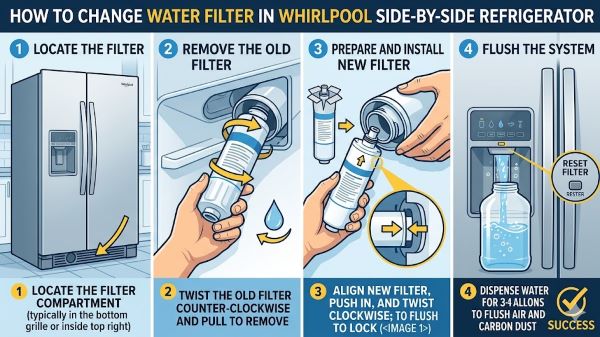
Step 1: Locate the filter Open the refrigerator door. Look at the upper right corner of the interior. You will see a round filter cartridge, usually blue or white, with a cap.
Step 2: Remove the old filter Depending on your model:
- Push-and-turn style: Push the filter in slightly, then turn it a quarter turn counterclockwise. The filter releases and you pull it straight out.
- Push-button style: Press the button or tab next to the filter. The filter ejects or loosens enough to pull straight out.
Have your towel ready. A small amount of water may drip as the filter comes out. This is normal.
Step 3: Remove the old filter cap (if applicable) Some filter models have a cap that transfers from the old filter to the new one. If your old filter has a separate plastic cap on the end, pull it off and set it aside. You will put it on the new filter.
Step 4: Prepare the new filter Remove the new whirlpool filter replacement from its packaging. If the filter has a protective cap on the O-ring end, remove it. If your old filter had a reusable cap, press it onto the same location on the new filter.
Step 5: Install the new filter
- Push-and-turn style: Insert the new filter into the housing. Align the tab or arrow on the filter with the slot in the housing. Push it in firmly, then turn a quarter turn clockwise until it locks. You should feel or hear a click.
- Push-button style: Align the filter and push it straight in until it clicks into place.
Do not force it. If the filter resists, pull it out and check the alignment.
Step 6: Run water through the dispenser After installation, dispense and discard approximately 2 to 3 gallons of water (about 4 minutes of continuous dispensing). This flushes air from the water line and clears carbon particles that are normal with a new filter. The first water that comes through may look cloudy or have small black specks. This is activated carbon from the new filter and is harmless, but discard it rather than drinking it.
Step 7: Reset the filter indicator See the reset instructions in the section below.
How to Change the Water Filter: Base Grille Location
This applies to older Whirlpool side-by-side models with the filter at the bottom front.
Step 1: Pull off the base grille The base grille snaps on and off. Pull it toward you from the bottom edge. It comes free without tools.
Step 2: Turn the filter a quarter turn counterclockwise The filter is horizontal. Grip the filter cap and turn it counterclockwise a quarter turn. Pull it straight out. Water may drip; have your towel ready.
Step 3: Install the new filter Remove the protective cap from the new filter. Insert the new filter into the housing, aligning the arrow on the filter with the slot. Push it in and turn clockwise a quarter turn until it locks.
Step 4: Replace the base grille Snap the base grille back into place.
Step 5: Flush the system Run the water dispenser for 4 minutes to flush the new filter.
Step 6: Reset the filter indicator Follow the reset steps below.
How to Reset the Filter Indicator Light After Whirlpool Filter Replacement
After whirlpool fridge filter replacement, the indicator light (orange or red depending on your model) stays on until you manually reset it. The refrigerator does not detect the new filter; it counts time and usage from the last reset.
Common reset methods for Whirlpool side-by-side models:
Method 1 (most common): Press and hold the Water Filter button on the control panel for 3 seconds. The indicator light changes to green or blue (depending on model) and the filter counter resets.
Method 2: Press and hold the Filter Reset button (labeled on some models) for 3 seconds.
Method 3: Press and hold Light and Water Dispenser buttons simultaneously for 3 seconds. This applies to some older models without a dedicated filter button.
Method 4 (touchscreen models): On models with a digital display, navigate to the Settings or Filter section on the screen and select Reset Filter.
If none of these work, check your model’s user manual. The reset procedure varies between Whirlpool generations. The manual is available as a free PDF on Whirlpool’s support page by entering your model number.
How Often to Replace the Whirlpool Refrigerator Water Filter
The standard recommendation is every 6 months or 200 gallons. Signs you may need to replace the fridge filter replacement sooner:
- The water dispenser flow rate drops noticeably
- Water or ice tastes or smells off even before the 6-month mark
- The filter indicator turns orange or red before 6 months (some models adjust based on usage rather than just time)
- Your area recently had water quality alerts or changes
After whirlpool refrigerator water filter replacement, the indicator light tracks the next replacement cycle automatically. You do not need to set a reminder manually, though writing the replacement date on the filter housing with a marker is a reliable backup.
Troubleshooting Common Problems After Filter Replacement
Water dispenser not working after filter change Air locks in the line are common after a filter swap. Run the dispenser continuously for 2 to 3 minutes. If water still does not flow, check that the filter is fully seated and locked. A partially inserted filter triggers a safety shutoff in some Whirlpool models.
Water is cloudy or has black specks Normal with a new filter. Flush 2 to 3 gallons through the dispenser and discard. The cloudiness (air bubbles) and specks (activated carbon) clear within a few gallons.
Filter light does not reset Hold the reset button for the full 3 seconds. Some users release it too early. If the light still does not reset after several attempts, try unplugging the refrigerator for 30 seconds, plugging it back in, and repeating the reset process.
Filter leaks after installation A leak at the filter housing usually means the filter is not fully seated. Remove it and reinstall, ensuring you hear or feel the click. Check that the O-ring is not damaged or missing on the new filter.
Whirlpool water filter is hard to remove Filters that have been installed longer than 12 months can seize in the housing. Try pushing in slightly before turning counterclockwise. If it still does not budge, use a towel for grip. Avoid using pliers directly on the filter body, as you can crack the casing.
Key Takeaways
- How to change the water filter in a Whirlpool side-by-side refrigerator: locate the filter (upper right interior or base grille), push and turn counterclockwise to remove, insert the new filter and turn clockwise until it clicks, flush 2 to 3 gallons through the dispenser, reset the indicator light.
- Replace the Whirlpool refrigerator water filter every 6 months or 200 gallons, whichever comes first.
- Identify the correct Whirlpool water filter replacement by checking the part number printed on your current installed filter before removing it, or by entering your model number on Whirlpool’s website.
- After whirlpool fridge filter replacement, flush 2 to 3 gallons of water to clear air and carbon particles. The first water may look cloudy; this is normal and clears quickly.
- Reset the filter indicator by holding the Water Filter or Filter Reset button on the control panel for 3 seconds. On older models, check the manual for the specific button combination.
- If the water dispenser stops working after a whirlpool filter replacement, check that the filter is fully seated. A partially inserted filter triggers a safety shutoff on most models.
- No tools are required for this job on most Whirlpool side-by-side models. The entire process takes under 10 minutes.